

Your Google Business Profile may look complete and still miss details that help it rank on the Local 3 Pack of Google Maps..
Checking every category, review, post, website detail, and ranking area manually takes time. A good GMB audit tool shows you where to look first.
I have used these GMB audit tools in my local SEO work for clients and compared their current features and prices.
This guide will help you choose the right one without paying for features you do not need.
I used audit findings to guide changes to my own profile. The screenshot below shows 201 profile interactions at the time it was taken. The tools did not create those interactions by themselves. They helped me see which areas needed attention.

Disclosure: This article contains affiliate links. If you purchase through my link, I earn a commission at no extra cost to you. I tested these tools personally before writing this comparison. All opinions are my own. Full disclosure policy.
My Recommendation: Which GMB Audit Tool Should You Choose?
If you want one simple answer, GMB Everywhere is my best overall choice for fast profile audits, competitor research, website checks, and basic local rank checks inside Google Search and Maps. It is the best all-in-one GBP audit tool so far. It has all the features that replace 5 tools and helps you spot ranking issues in any GBP.

GMB Everywhere
The Google Business Audit Tool to Rank in The Local 3 Pack of Google Maps
Try GMB Everywhere For FreeThe other tools make more sense when you need a specialist job:
Choose GMB Everywhere if you want fast audits and competitor research inside Google Search and Maps.
Choose Localo if you want guided tasks and complete GBP management.
Choose BrightLocal if your agency needs broader local SEO reporting.
Choose Local Falcon if map rank grids and ranking history are your priority.
Choose PlePer if you mainly research categories, duplicates, and profile changes.
5 Best GMB Audit Tools Compared in 2026
| Tool | Best for | Main strength | Current price or trial |
| GMB Everywhere | It suits freelancers, agencies, and business owners. | It combines profile, competitor, website, and manual rank checks inside Google Maps. | It has a free option or a $30 monthly plan. |
| Localo | It suits owners who want clear tasks and teams managing profiles. | It turns audit findings into guided work, monitoring, and profile management. | Its Single Business plan is $49 per month or $39 per month when billed annually. It has a 14-day trial. |
| BrightLocal | It suits agencies that manage several clients or locations. | It combines local audits, rank tracking, citation work, reviews, and reports. | Its plans start at $39 per month. It has a 14-day trial. |
| Local Falcon | It suits consultants who need visual proof of map visibility. | It shows how a profile ranks from many points around a service area. | Its monthly plans start at $24.99 for 7,500 credits. |
| PlePer | It suits people who need deep category and listing research. | It reveals categories, duplicate listings, profile data, and change monitoring. | It has free tools. Paid plans start at $18 per year for one listing or $10 per month for local professionals. |
This Pricing was checked as at the time of writing this article. Software prices and limits can change any time, so confirm the final amount before you pay.
5 Best GMB Audit Tools for Local SEO (2026 Edition)
From my experience so far, there are dozens of local SEO tools on the market, but only a few are truly effective when it comes to auditing Google Business Profiles.
Below, I’ve handpicked the top tools worth using in 2026, including free and paid options, based on real features, use cases, and value.
1. GMB Everywhere: Best Overall for Fast GBP Audits

GMB Everywhere is a Chrome extension that adds local SEO research tools to Google Search and Google Maps. You can open a business listing and review useful profile and competitor information without switching to a separate dashboard for each check.
In my workflow, I use it to quickly understand a listing. It is especially useful before a client call, during competitor research, or when I need to explain a visible gap in simple language.
What GMB Everywhere Checks
The extension can show profile categories, reviews, posts, photos, services, and other public business information. Its audit tools help you compare your listing with businesses that already rank in the local results.

The Latest GMB Everywhere Release 7 Added 3 Important Features:
1. The Website Audit compares the GBP with the linked website. It checks if details such as the business name, address, phone number, hours, and categories match what is displayed on the website. It also reviews website content and elements that support the profile. This helps ensure NAP consistency, which is a top ranking factor.

2. The updated Rank Check lets you place several pins on a map and see the business position at each point. Green shows the top three, amber shows positions four to ten, and red shows position eleven or lower, or no result found.
3. The GBP Image Generator (beta) creates high-converting graphics for Google Business Profile posts and social media. It uses business details and brand colours, but the quality can vary because the feature is still in beta.

Why I Recommend It
GMB Everywhere brings profile checks, competitor research, website alignment, and simple location checks into one browser workflow. That combination is useful when you need answers quickly and do not want to set up a full local SEO platform.
The Website Audit is the most useful part of the update for an audit article. A business can have a well-completed profile but send visitors to a website with different contact details, weak service pages, or no clear local relevance. Seeing both sides together makes the audit more practical.
The multiple pin Rank Check is also useful, but it does not fully replace a scheduled map grid tracker. Use Local Falcon when you need automatic grids, recurring scans, history, and formal rank reports.
GMB Everywhere Pricing
You can start with the free option. The paid plan is currently listed at $30 per month. Start free, then upgrade only when the extra audit limits and features save you enough time.
Pros
- It works inside Google Search and Google Maps.
- It gives beginners a free way to start.
- It combines profile, competitor, website, and location checks.
- It helps freelancers find useful talking points before a sales call.
- Its Website Audit makes profile and website mismatches easier to explain.
Cons
- It requires Google Chrome.
- Its free option has limits.
- Its Rank Check is not the same as a full scheduled geo grid tracking platform.
- Its Image Generator is still in beta, so you should review every image before publishing it.
Who Should Choose It?
Choose GMB Everywhere if you are a freelancer, local SEO consultant, small agency, or business owner who wants fast audits and competitor research. Skip it as your only tool if your main need is automated monthly rank reporting across many locations.
You can also read my full GMB Everywhere review or follow my guide on checking competitor Google Business Profile categories.
2. Localo: Best for Guided Optimization and Ongoing Management

Localo is better for people who do not want an audit report alone. It connects the audit to weekly tasks, profile monitoring, rank tracking, review work, post creation, and ongoing management.
This is useful for a business owner who wants the tool to say what to work on next. It also suits freelancers and agencies that need a repeatable process for several clients.
What Localo Does Best
Localo reviews the profile, competitors, and local visibility, then turns the findings into guided actions.
Its Position Map shows local rankings, while its management tools help with posts, reviews, and profile work.
The main advantage is direction. Raw data can leave a beginner asking, “What do I fix first?”
Localo is built to reduce that guesswork.
Localo Pricing
The Single Business plan is currently $49 per month or $39 per month when billed annually, plus VAT where it applies. The Pro plan is much higher because it is built for freelancers and agencies managing more profiles. Localo offers a 14 day trial without a card.
Pros
- It turns findings into clear weekly tasks.
- It combines audit, rank monitoring, reviews, posts, and profile management.
- Its Single Business plan is designed for one local business.
- Its Pro plan includes tools for larger client workflows and reports.
Cons
- Its paid plans cost more than a simple browser extension.
- Its best agency features require a higher plan.
- Its automated suggestions still need human review before you change a client profile.
Who Should Choose It?
Choose Localo if you want ongoing guidance after the first audit. Skip it if you only need quick competitor research or a one-time category check. For freelancers and agencies, it has a client acquisition feature that has helped me get 135 local SEO leads in one click.
Localo is the best GMBEverywhere alternative. Read my Localo review for local SEO agencies before choosing the higher plan.
3. BrightLocal: Best for Agencies That Need a Full Local SEO Suite

BrightLocal is a broader local SEO platform. Its tools cover local search audits, Google Business Profile checks, rank tracking, citation work, review management, and client reporting.
This makes it a stronger fit for an agency that already manages several local campaigns. You can keep audits and ongoing reporting in one account instead of using a separate tool for every task.
What BrightLocal Does Best
BrightLocal is strongest when the profile audit is only one part of the service you sell. You may also need to track local rankings, find citation problems, monitor reviews, and send reports to clients.
Its reporting features are useful when a client needs a clear record of what changed and what improved. It also helps teams repeat a similar process across locations.
BrightLocal Pricing
Plans currently start at $39 per month and change based on the number of active locations and features. BrightLocal offers a 14-day trial without a card. Some services, such as citation building, may have separate fees.
Pros
- It combines several local SEO tasks in one platform.
- It supports agencies that manage multiple clients and locations.
- Its reports are more suitable for ongoing client work.
- Its tools cover citations, reviews, and rankings as well as audits.
Cons
- Its dashboard takes longer to learn than a simple Chrome extension.
- Its starting price may be too much for one small business that only needs a quick audit.
- Its extra services can increase the total cost.
Who Should Choose It?
Choose BrightLocal if you run full local SEO campaigns and need reporting across clients. Skip it if your only goal is a fast profile and competitor check.
Try BrightLocal free for 14 days
4. Local Falcon: Best for Geo Grid Rank Tracking

Local Falcon shows how a Google Business Profile ranks from different points around a town, city or service area. The result appears as a visual grid, which makes location-based ranking differences easy to explain.
A business may rank well near its address and disappear a few streets away. A single rank check can miss that. Local Falcon helps you see the wider pattern.
What Local Falcon Does Best
Local Falcon is useful when you need to prove where visibility is strong, where it drops, and how the pattern changes over time. This is valuable for monthly client reports and for measuring the effect of local SEO work.
It is important to understand the limit: Local Falcon is mainly a rank tracking platform. It does not replace a full profile audit that checks categories, reviews, photos, posts, website alignment, and profile completeness.
Local Falcon Pricing
Monthly plans currently start at $24.99 for 7,500 credits. Every scan uses credits, and unused monthly credits can expire. Choose your grid size and scan frequency carefully so you do not waste the plan.
Pros
- It shows local rankings in a clear visual grid.
- It helps you measure visibility across a real service area.
- Its history and reports make ongoing changes easier to prove.
- Its plans can scale for agencies and larger brands.
Cons
- It does not provide a complete Google Business Profile audit.
- Its credit system can be confusing at first.
- Large grids and frequent scans can use credits quickly.
Who Should Choose It?
Choose Local Falcon if ranking visibility and client reporting are your main needs. Pair it with GMB Everywhere or another profile audit tool when you also need to find what to fix.
5. PlePer: Best for Categories, Duplicates and Profile Research
PlePer offers a Chrome extension and a collection of local SEO tools. It is useful for category research, duplicate listing checks, review links, profile analysis, and monitoring changes to business information.
PlePer can reveal detailed profile data that is useful during competitor research. Its category tools are especially helpful when you need to compare category options by country and language.
What PlePer Does Best
PlePer is strongest for local SEO specialists who enjoy detailed research. It can monitor changes to categories, hours, reviews, questions and answers, and other profile information. Its paid plans increase the number of listings you can analyse and monitor.
The tools are useful, but the experience feels more technical than Localo or GMB Everywhere. A beginner may need more time to understand which report matters.
Pleper Pricing
Several tools are free. The paid Single Business plan starts at $18 per year for one listing. The Local Pros plan is $10 per month, while the Local Agencies plan is $25 per month. Check the analysis and monitoring limits before you choose.
Pros
- It provides several free local SEO tools.
- Its category database supports country and language research.
- Its paid plans can monitor listing changes, reviews, and questions.
- Its duplicate search and profile analysis support deeper audits.
Cons
- Its interface is less beginner-friendly than the simpler tools in this list.
- Its free tools do not create a complete client-ready audit workflow.
- Its deeper monitoring and analysis require a paid plan.
Who Should Choose It?
Choose PlePer if category research and detailed listing data are your priorities. Skip it if you want a polished, guided action plan with very little setup.
Explore PlePer’s free local SEO tools
Why a GMB Audit Matters in 2026
According to BrightLocal’s 2024 Local Consumer Review Survey, 98% of people use the internet to find local businesses, and Google Maps is the top channel.
Google now calls it a Google Business Profile, or GBP. Many people still search for GMB audit tools, so I use both terms in this guide.
Google says local results are mainly based on relevance, distance and prominence. Complete and accurate business information can help Google understand when a profile matches a local search. Reviews, links and how well-known a business is can also affect prominence.
An audit tool helps you find gaps related to these areas. It may show a weak category choice, different contact details on the website, low review activity, missing profile fields or poor visibility in part of a service area.
However, no audit tool can guarantee a top three ranking. It gives you evidence and a clearer action list. You still need to make accurate changes, follow Google’s rules and measure what happens.
How I Compared These Tools
I focused on 5 practical questions:
- Does the tool check the profile itself, not only map rankings?
- Does it help you understand competitors?
- Can a beginner understand what to do next?
- Can a freelancer or agency share useful findings with a client?
- Does the price make sense for the number of profiles you manage?
This matters because a profile audit, a map rank tracker and a full local SEO platform are not the same thing. You may need one tool or a small combination, depending on your work.
Best GMB Audit Tool by Use Case
The best choice depends on the work you need to complete.
A. For Freelancers and Local SEO Consultants
Start with GMB Everywhere. It is fast enough for prospecting, simple enough to explain on a call, and useful for both profile and competitor research.
If you sell recurring reports, add Local Falcon for scheduled map visibility or use BrightLocal for a wider agency workflow. My guide to selling GMB audits as a freelancer explains how to turn findings into a useful service.
If your work is mainly for freelancers, compare the options in my focused guide to the best GMB audit tools for local SEO freelancers.
B. For One Local Business
Use GMB Everywhere if you are comfortable checking findings and making changes yourself. Choose Localo if you want a guided list of tasks and ongoing help managing the profile.
C. For Agencies With Several Clients
Choose BrightLocal when you need a full local SEO suite and client reporting. Choose Localo Pro when guided optimization and profile management are more important. Add Local Falcon when geo grid history is a core part of your reports.
D. For Category and Competitor Research
Use GMB Everywhere for fast checks inside Maps. Use PlePer when you need a deeper category database, duplicate checks, or profile change monitoring.
Start with GMB Everywhere for free
How to Run a Quick Audit With GMB Everywhere
You don’t need complex software or expensive SEO platforms to run a solid Google Business Profile audit.
In fact, with the GMB Everywhere Chrome extension, you can analyze your listing or your competitor’s in less than 60 seconds, directly from Google Maps.
Here’s how to do it step-by-step.
Step 1: Install GMB Everywhere
Go to the official website and install the Chrome extension here: Get GMB Everywhere
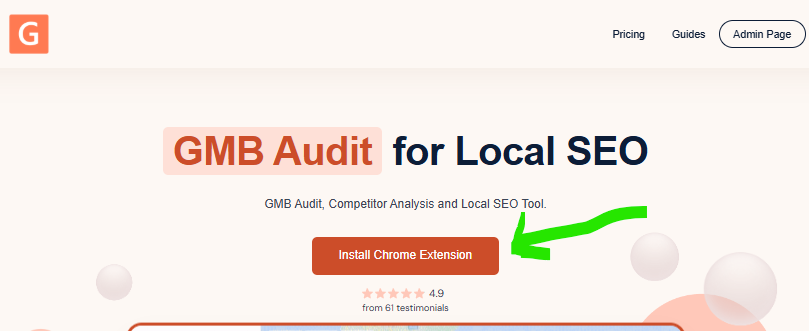
It’s free to start and doesn’t require you to log in or create an account.
Step 2: Open Any Google Business Profile in Google Maps
Search for your business (or a competitor’s) on Google search or directly on Google Maps.
For this demonstration, I will search on the Google search bar for “Carpenter near me”.
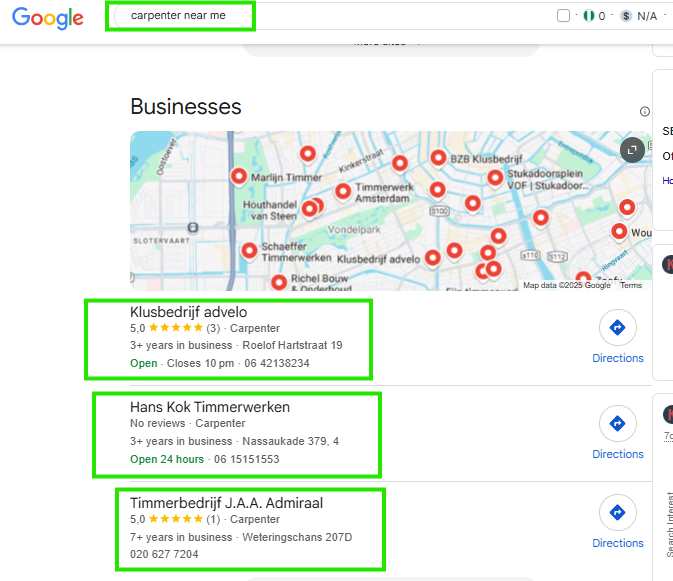
From my screenshot, you can see the 3 top businesses ranking on the Google Map Pack for it. Google Map Pack is the name, reviews, and details of the business that show up.
Then, click on the listing to bring up the full business profile sidebar.
You can do this for:
- Your own business
- A direct local competitor
- A potential client’s profile (if you’re a freelancer)
Step 3: Click the GMB Everywhere Extension Icon
Once the business listing loads, click on the GMB Everywhere extension in your Chrome toolbar.
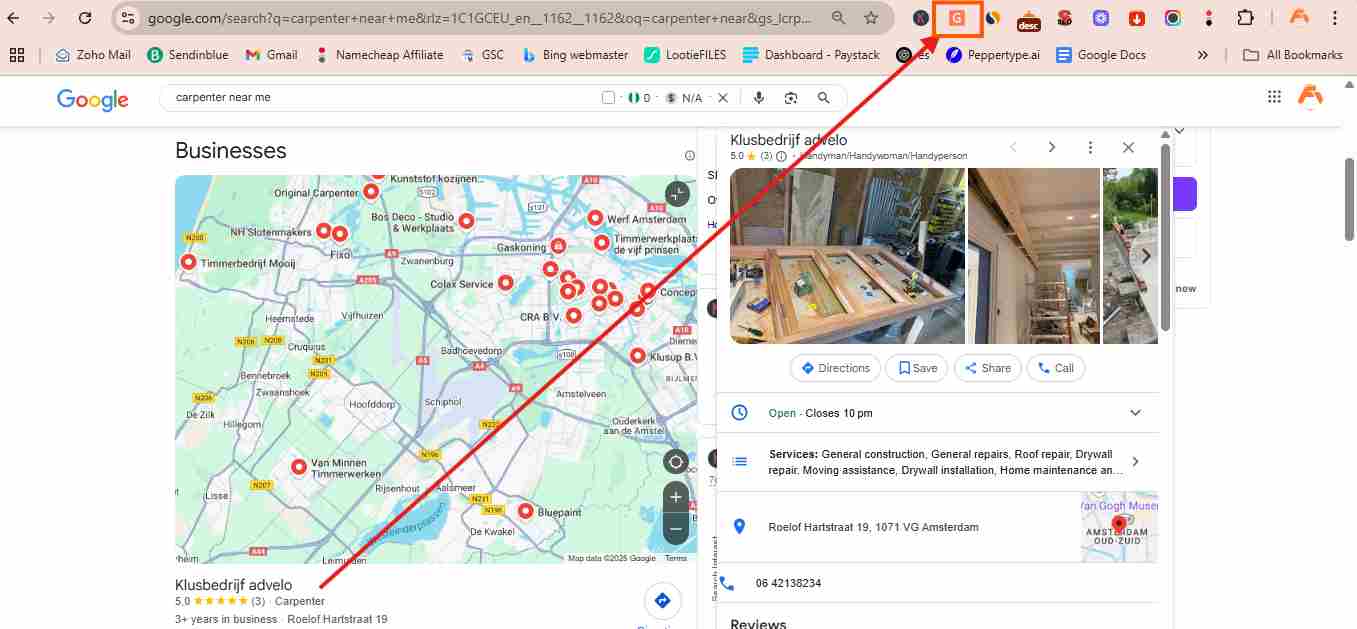
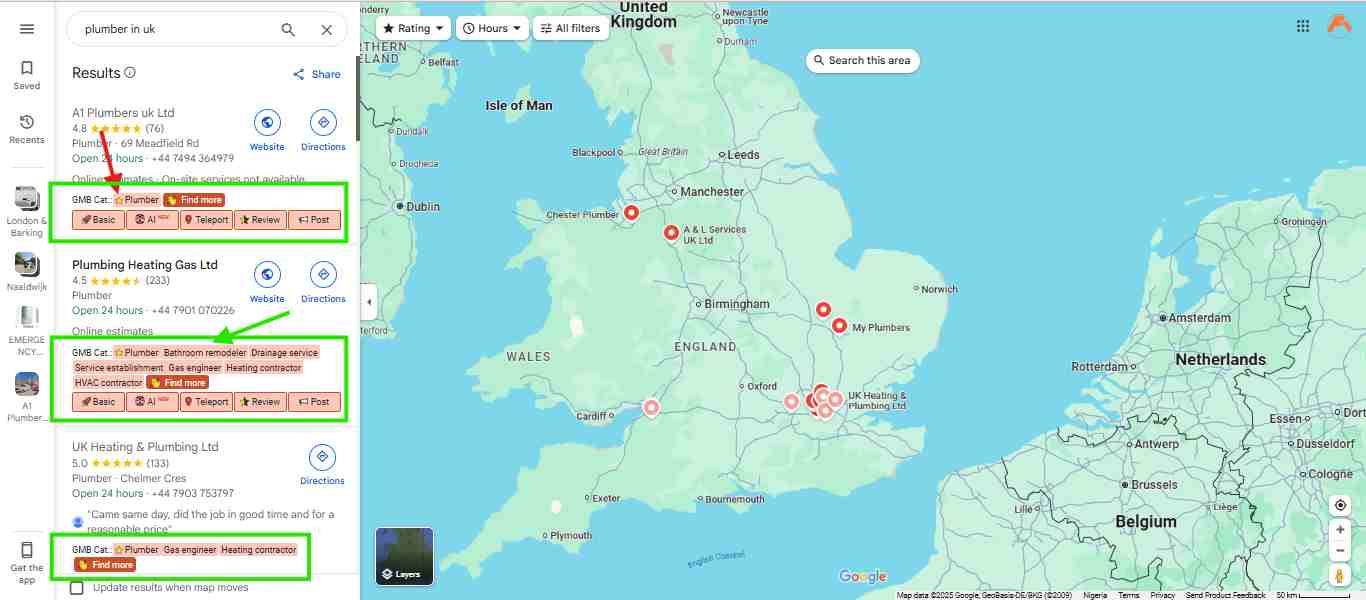
The tool will instantly pull in all available data and display it right beside the profile.
You’ll see:
- Primary and secondary categories
- Star rating and number of reviews
- Number of photos
- Posting frequency
- Address and NAP(Name, Address, and Phone) data.
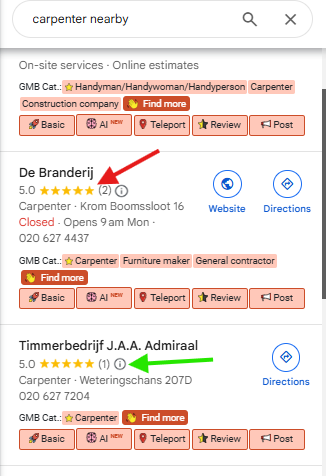
Then, it’s automatically opened in a Google Map like this:
Step 4: Analyze the Audit Results
Use the data to identify:
- Whether you’ve selected the most competitive categories.
- How active your profile is compared to competitors.
- If your review and posting volume needs improvement
- Any NAP inconsistencies that might hurt your rankings
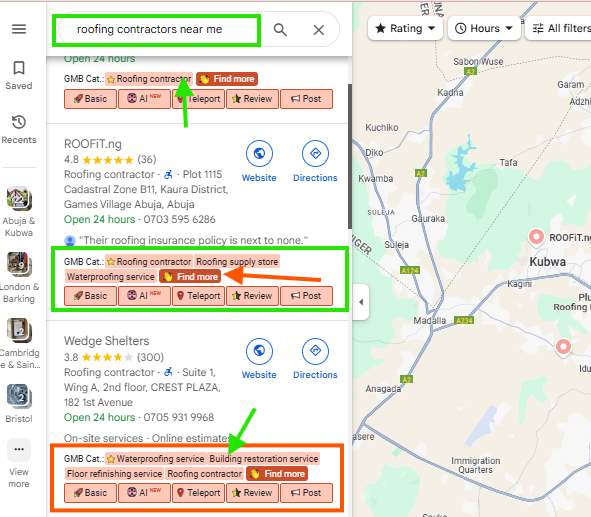
For freelancers, this is the perfect moment to take a screenshot or download the audit PDF to include in a client report.
Click each of the features that the GMB Everywhere tool has provided for you to further audit your GMB profile, like:
- Use the “Basic” feature to do an overall audit of your profile to find areas of improvement
- Use the “AI” feature to see other tools to further optimize your listing faster without thinking too much.
- Use the “Teleporter” feature to find the location and competitors of the business at a particular location.
- Use the “Review” feature to find reviews on your profile
- Use the “Post” feature to find posts your competitors make and where you need to improve.
Step 5: Run the Website Audit
Click the Website button and compare the profile with the linked website. Confirm that the name, address, phone number, hours, categories, services, and locations are accurate and well supported.
Step 6: Check More Than One Map Point
Use Rank Check and place several pins around the business area. This shows whether the listing is visible only near the address or across a wider area.
Step 7: Prioritise the Findings
Fix accurate business information first. Then review categories, website relevance, reviews, photos, and other profile content. Do not copy a competitor or add information that is not true for the business.
If category selection is the main issue, follow my guide on choosing the best Google Business Profile category. For a wider action plan, use my Google Business Profile optimization guide.
Step 8: Take Action
If you spot issues in your profile:
- Log in to your Google Business dashboard.
- Click Edit to update or add relevant categories.
- Start posting regularly if you don’t.
- Ask satisfied customers for reviews.
- Make sure your business info is consistent across directories.
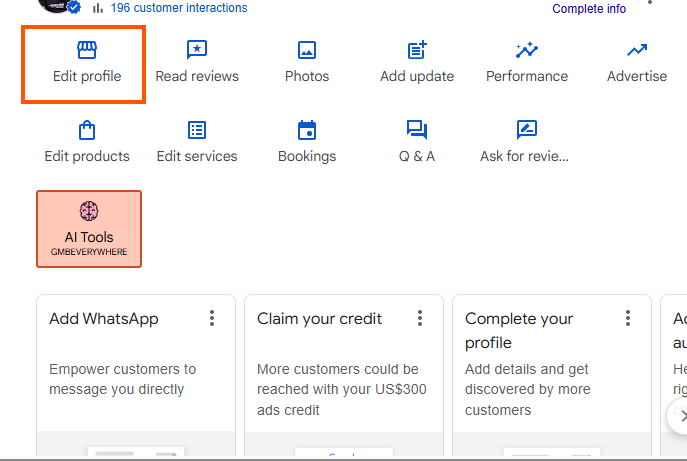
For competitor analysis, create a list of top-performing categories to test on your listing.
Pro Tip: Use GMB Everywhere to audit the top 3 Google Map Pack listings in your niche. This will give you a clear picture of what works and what you’re missing.
Which GMB Audit Tool Is Right for You?
Choosing the right audit tool depends on your goals, your budget, and how deep you need to go with Google Business Profile optimization.
My Recommendation
GMB Everywhere is the best GMB audit tool for most beginners, freelancers, and small agencies that want fast answers inside Google Search and Maps. Its new Website Audit and multiple pin Rank Check make it more useful than a simple category extension.
Choose Localo when you want guided work after the audit. Choose BrightLocal for broader agency reporting. Choose Local Falcon for serious map rank tracking.
Choose PlePer for detailed category and profile research.
Start with the tool that matches your immediate job. You can add another tool when a client or campaign gives you a clear reason to do so.
If you’re looking for a reliable, beginner-friendly tool that helps you instantly analyze and improve Google Business Profiles, GMB Everywhere is the best place to start.
It’s fast, accurate, and requires no learning curve, whether you’re optimizing your own listing or auditing dozens for clients.
Conclusion
Google Business Profiles are one of the most powerful tools in local SEO, but most businesses leave them half-optimized.
A simple GMB audit helps you:
- Discover what’s missing.
- Reverse-engineer your top competitors.
- Improve your chances of ranking in the local 3-Pack
And now, you don’t need expensive software to do it.
Start with GMB Everywhere; you can run powerful, actionable audits with one click and finally understand what your competitors are doing right.
👉Install GMB Everywhere Chrome Extension Now — It’s Free!
Continue Your Learning:
- How to Check Competitor Google Business Categories (Fast & Free).
- How to Pick the Best Category for Your Business on Google.
- How to Sell GMB Audits as a Freelancer.
- Google Business Profile Optimization: The Only Complete Guide That Works in 2025.
Frequently Asked Questions
What Is the Best Free GMB Audit Tool?
GMB Everywhere is my best free starting option for quick profile and competitor checks inside Google Maps. PlePer also offers useful free category and listing tools. Free plans have limits, so choose a paid tool when you need more audits, monitoring, or client reports.
Can I Audit a Competitor’s Google Business Profile?
Yes. Tools such as GMB Everywhere and PlePer can analyse public listing information, including categories, reviews, posts, and other visible data. Use competitor findings as research. Do not copy false or irrelevant information to your own profile.
What are the benefits of auditing my Google Business Profile?
Auditing your Google Business Profile ensures that your business information is accurate and optimized, which can lead to improved local search rankings. Benefits include increased visibility in local search results, better customer engagement through accurate information and reviews, and a competitive edge by identifying and implementing best practices observed in top-ranking competitors’ profiles.
How Often Should I Audit a Google Business Profile?
Run a full audit every three months for an active local business. Check important details sooner after a change to the address, phone number, hours, website, services, or category. Competitive businesses may also review rankings and reviews each month.
Can I audit my competitors’ Google Business Profiles?
Yes, auditing competitors’ profiles can provide valuable insights into their optimization strategies. Tools like GMB Everywhere allow you to view competitors’ categories, review counts, and posting activity, helping you identify opportunities to enhance your profile
What Is the Difference Between a GBP Audit and a Geo Grid Scan?
A GBP audit checks the quality and completeness of the profile, website alignment, reviews, categories, and other business information. A geo grid scan measures how the profile ranks from several map points. You often need both to understand what may be wrong and whether visibility is improving
Will a GMB Audit Tool Improve My Rankings?
The tool itself will not improve rankings. It helps you find problems and opportunities. Results depend on the accuracy of your changes, the business location, competition, website, reviews and Google’s local ranking systems.
If you like this article, then please subscribe to my YouTube Channel for value-packed video tutorials. You can also find me on LinkedIn, Twitter, and Facebook.
Affiliate Disclosure: Please note that some of the links on this page are affiliate links, meaning I may earn a small commission if you purchase after clicking through the link (at no extra cost to you). I only recommend tools I’ve personally tested and believe will truly help small businesses succeed. Your support helps keep this site running.


